Danielle Blasse 7010 - Cloe Pace-Soler 7352 - Rebecca Holloway 7279 - Natasha Welch 7399
Townley Grammar School - 14109
Showing posts with label sound. Show all posts

Thursday, 6 February 2014

Final tweaks on sound

Final tweaks on sound

After receiving feedback from our audience about our trailer, a lot of them noticed that minor parts of the sound could be changed slightly producing a more fitting sound.
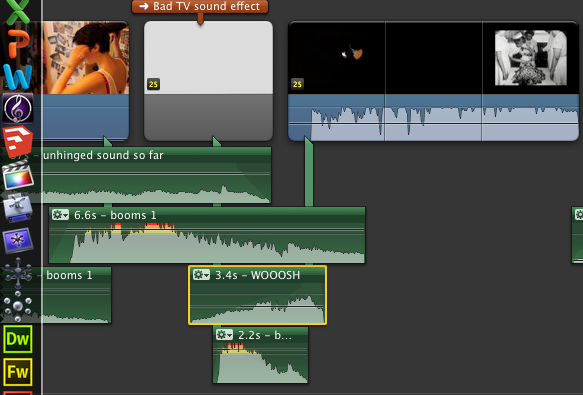
Our audience noticed that the "booms" leading up to the montage were not effective enough, however after some consideration we realised that the build up in sound towards the montage was actually not effective enough at all.

To overcome this issue, we decided to not use the same "boom" track in the build up to the montage that is already being used in the montage. That way, the new timbre of the "boom" in the montage will have a bigger and more effective impact on our audience as it's not a sound that they have already heard in our trailer. It makes it less predictable. We decided to cut the piano track earlier than we had previously, therefore it didn't play during the montage scene.

Additionally, we also also cut the "woosh" audio clip from one of our audio tracks that were previously used in the trailer and applied it to the end of the title to create a bridge passage between the sound of the scenes before and the montage scene. Once we had applied all of these changes to the sound, we copy and pasted the "booms 1" track below the "woosh" creating another layer but we cut to the climax of the "boom 1" audio clip and this added to the tension and created an entrance that was needed for the montage scene. Furthermore, the "boom 1" track was cut as close to the climax of the track as possible, this way the booms got faster as we neared the montage building up suspense and anticipation in the trailer. Using track "booms 1" instead of the "booms" track which were used in the montage scene allowed us to pace ourselves a lot more in the build up rather than building up the tension in the wrong place altogether. Overall, this solved the problem and the booms used in the montage scene, proved to be more effective.


Friday, 10 January 2014

Layering the audio of the news-clips

Layering the audio of the news-clips

Step 1:
- First I detached the audio from the videos clips. 
- I then dragged them along so that they followed the news clip in the montage and made them overlap one another in certain areas which would make it sound overwhelming to the audience. 
Step 2:
-I also repeated a few words such as 'insanity' throughout to quicken the pace and suggest the instability of the protagonist's mind. 
Step 3:
- Once I had the layout sorted I then played around with the effects, adding distortions to the audio or making it sound demonic. 
- One effect I did was called 'monster' which made the audio sound much deeper than it actually was, another made the audio have an echo which I added onto the clip mentioning 'hallucinations.'
Evaluation:
- Although the tension doesn't build I feel it will sound much more effective with the cinematic bass sounds at every black slide and with the high tension music leading to the loft scene. 
- We are also considering adding a 'whooshing' sound at the end before the silence in order to signal to the audience the end of the climax. 

Inputting the sound into our trailer

Inputting the sound into our trailer

Now that we have been able to produce non diegetic sound to go alongside our trailer, all we have left to do is insert it into our trailer with the other non diegetic sound that we have already inserted. 


I started by aligning the new non diegetic sound up with the production company clip, in order to have the sound begin as the production company is shown on screen, this was it eases the audience into the narrative of the trailer with no sudden changes in the sound too early on in the trailer. However, I did encounter an issue when inputting the non diegetic sound of the piano melody into the trailer.


 Although I had made sure that the sound matched up to the exact timings of the trailer as I produced it, I did not trim the track of the "ear ringing noise" therefore it went on further than needed. To resolve this issue, I had to delete that individual track from the Logic Pro project, bounce the file and import it into our footage. From then, I had to import the "ear ringing noise" file into iMovie separately and adjust it by changing its fading options in accordance to the piano melody. 

I noticed that the ear ringing noise, once aligned to our footage, that it automatically lowered the volume of the non diegetic sound piano melody. To resolve this, I had to select the ear ringing noise track and unselect the ducking option, which enabled the dominant track to be automatically lowered in volume so new tracks could be heard. By doing this, it allowed the piano melody to dominate the trailer instead, which was what we were hoping for. 


At this stage of inputting the sound into our trailer,  I decided that the other non diegetic sounds that we had recorded prior to making the piano melody such as the whispers would extremely well with our piano melody. I dragged the whispers into place and then had to make sure that they did not dominate the sound entirely. We also thought it would be effective to add the sound of an old TV as it would help build suspense and add to the relevance  of the bad TV effect on our  green screen footage. 


Overall, adding the sound to our trailer has definitely heightened the effect of it. The sound for our trailer becomes the climax in terms of sound. We made sure we were able to build tension threough using sound effects such as 'swishing' noises and sinister sounding crashes. We applied each track carefully making sure that nothing overlapped the other causing extreme discomfort in the sound all together. We also had to make sure that the volumes of each track were fairly similar anbd worked well together, so we had to manually apply a fade out or fade in to certain tracks so the audio sounded together and not random and detached.
The montage scene is an example of how we manipulated audio of a video clip, in the sense that we layered and echoed certain dialogue such as "Schizophrenia" so the audeince to make a direct link to what our narrative entails. 
Lastly, we chose to use silence after the montage scene so the suspense and tension that we built through our montage is now being held by the audience so that way we can have them on the edge of their chairs. We decided to end our trailer with the scream from the antagonist in the loft and non diegetic sound as the title of our trailer flickers on the screen.


Unhinged sound

Unhinged sound

For our trailer, we now have to input all of our non diegetic sound onto our footage. Each scene of our footage uses different amounts of sound to build suspense up to the end of our trailer. To make the process of inputting the sound easier, we decided to produce and manipulate our choice in sounds using Logic Pro and then exporting then as mp3 files ready to attach to our footage. 

In order to do this, we had to figure out what kind of non diegetic sound would suit our trailer the best. This formed to be extremely difficult for us as our trailer explores many themes within it such as discrimination and privacy. We also wanted to make sure that the sound built up to the montage scene, by layering the audio of documentaries based around Schizophrenia onto each other. Therefore, we would have to keep the non diegetic sound up to the montage scene fairly simple in terms of the melody and dynamics. We decided that a simple piano melody that builds up to a climax would suit our trailer extremely well. 

To achieve the sound we were hoping for, I had to manipulate the music by watching our footage at the same time, to see what would fit the best where. This also opened up the opportunity to try various new sounds without it effecting our trailer whatsoever as the sound, in the screen shot on the left, is still being edited.
 To edit the sound, I used Logic Pro as it enabled me to manipulate each track independently of any others that I already had inserted into the project. For example, once I had recorded the simple piano melody for our library scene, I needed to layer over the sound of a high ringing noise to create a minute disequilibrium in the sound. However, once I inserted the high ringing noise, it was extremely loud in comparison to the piano melody which was our dominant sound. In order to adjust this, I had to open the mixer, select the track that I had placed the high ringing noise on and pull down the fader to just adjust its sound. 

Producing and editing the sound for the trailer alongside our footage helped incredibly! When looking through  our footage in relation to the sound, it was clear that another layer needed to be added, in order for the second title to be as effective as it can. Therefore, I decided to add a low rumbling bass sound to the sound, making sure that the places that the bass beat is played works, and fits in effectively to our trailer.
To make sure that the bass track that I had produced fell in all the right places, I double clicked on the tracks and was able to see exactly where all the sounds aligned together, as shown in the screen shot to the left. Once I aligned the sounds into the correct places in terms of the footage, the sound covers a large majority of our trailer. In order to complete the sound production of our trailer, all that it left to do is input the montage scene and sound.  This is what the sound composes of so far:


Thursday, 19 December 2013

Sound production for Time lapse and Library scene

Sound

It is vital that we start to work on our sound now that our filming is completed and our editing is well underway. We need to be able to provide sound throughout our trailer in a professional manner.

Time lapse and library scene
Our trailer opens with a time lapse and library scene of which both focus predominantly on the protagonist. We started to collate a few ideas around non diegetic sound for this scene and decided that it would be best to produce an instrumental piece of sound. To do this we used Logic Pro. Once I decided on the most effective motif, I played around with the left hand accompaniment to make sure that the foundation of the motif layer was sufficient. I continued to manipulate the motif in ways that I could to produce different sound with it that allowed to build the tension as it developed. Once I was satisfied with the layers surrounding the motif it was time to put them together. We are also using a white noise sound effect, which has already been edited into our footage to convey the protagonists discomfort and build the tension as things spiral out of control.
 Although, an issue I ran into was the difference in note values. In order to overcome this I was able to double click on the audio track and either slide or squeeze the length of notes to correct the mistakes. This proved to be extremely helpful as it saved me from recording again.

Evaluation of time lapse and library scene sound:
Looking back over our research we realised that using an instrumental track for the opening would be the best idea. This is because we would be able to manipulate it easily and build up more of a suspense. Overall, we think that the sound for the time lapse and library scene is effective as it doesn't give too much away but still hints at disequilibrium in the narrative of the trailer as it develops.

Montage and green screen sound
As well as our time lapse and library scene being key parts of our trailer. So is our montage and green screen scenes. When using the green screen, we have already established that we are going to be using whispers layered on top of each other that repeat the name "Charley" as the protagonists imaginary friend whispers into her ear. We also felt that this was very effective as it is specific to our characters and we have been able to manipulate it further to create the discomfort that we were aiming for.

 Additionally, we have also decided to use generic trailer transition sounds such as loud crashes and bangs as the protagonist loses her grip on reality. A key scene that we could apply these sounds to would be the scene where the protagonist stalks the antagonist - Charley, via Facebook and webcam. As well as using the generic trailer sounds, we will be able to layer the discordant sounds on top of the eerie melody of the piano without it sounding off key as these sounds tend to not be homed by any such key. We also have a lot of choice when it comes to manipulating the sound to sound eerie and discomforting due to our prior research that is shown below:

Now that we non diegetic sound for the beginning of our trailer, we need to make sure that we edit it into our footage. Following on from that we also need to be able to narrow down what sounds that we wish to use as we are only limited to 1 minutes worth of sound. Once we have decided on the sounds that we are going to use, instead of layering the sounds that we wish to use in iMovie, we will need to manipulate them and create one track solely for entire sound that we will use for our trailer. This will hopefully avoid the problem of confusing sounds and having too many tracks when editing. Therefore, if we wish to add any further tracks, e.g. the white noise sound effect, we will be able to build tension sufficiently without it sounding unprofessional. 

Tuesday, 10 December 2013

Sound Timeline

Time lapse - Library Scene


At the beginning of the trailer, we would like the music to be much slower and with a sad tone to make sure that the audience can tell that we intend them to sympathise with her and her illness.
I like this piece of music because it is extremely simple and starts off very slow which makes it more poignant, especially when coupled with the time lapse.
We will consider stopping the sad piece of music at the abrupt moment when the full shot of the Protagonist is revealed banging her head, and then continuing with another piece at the next title screen.


Another option is to continue the simple piano piece (although stop it shortly at the abrupt moment) but start a more dramatic sounding piece over the top of it at the next title screen, something like this so that it blends more smoothly.

Bedroom Webcam Scene


At this point we would potentially have an upbeat pop track to indicate what the Victim would be listening to in her bedroom, however at each shot of the protagonist the music would distort to give a more chilling effect. This would then lead into the more distorted, scary sounding track for the rest of the trailer.
However, another option would be to just continue the piano music but with layers of dramatic and creepy soundtrack over the top, to indicate at the fear this part of the trailer is supposed to induce. This may be more successful as otherwise in the short space of a minute we would have too many different sounding soundtracks which may be unprofessional.

Montage Scene


We will take inspiration from Sinister trailer for the montage scene, as we will have a repetitive sound which gets increasingly fast until it pauses for a couple of seconds before a loud shrill sound.
During the montage scene, we will have to find a noise which replicates this but is relevant to our trailer, which then during the few seconds of the victim waking up in the lift pauses, and then we will hear her loud shrill scream.

We may also use the idea of having sound effects specifically placed at each title to give them more emphasis.


Loft scene

We will have to edit the scream so that is it maybe louder and more shrill, as well as maybe including some other sounds over the top of it like a low bang sound which would help make the audience jump at this stage, which is our aim.

Thursday, 28 November 2013

Montage Sound

Montage Sound

We are going to be using a montage scene at the end of our trailer to make sure that the plot comes across as detailed yet as quickly as possible. However, we need to bare in mind the sounds that we are going to be willing to use. As we do not all of our footage just yet and we still need to edit the montage scene, producing non diegetic sound for the montage scene will prove difficulty at the moment. Instead, we are paying close attention to the montage scenes in other psychological films such as, the butterfly effect and a beautiful mind. We have noted that they use suspenseful, atmospheric sound, with the use of jumps and dissonances in places of their choice to fit their trailer. 

With the use of the sound above, we can manipulate it to be a lot faster or slower dependent on the foundation track of the sound that we choose. This can help to produce a good scare factor within the trailer therefore having a big impact on our audience. Transition effects also tend to sound a lot better when layered on top of multiple sounds rather than on their own, allowing the suspense before it to be built up to a peak before letting it down again. 

Preferably all tracks would all be layered on top of each other, after we have manipulated some of them using Logic Pro to make them either faster or slower. The Dark Rhytmic Ambience sound effect experiments using fast and slow tempos allowing us to cut and move around the track as we please when it comes to editing all the tracks together. A montage scene is usually extremely fast paced therefore the tempo for all of the tracks will need to be increased. 

Another idea, would be to collate the sounds of all the objects around the protagonist as we enter the montage scene. Therefore the ticking of a clock would grow in volume, someone writing, and so on. Once these sounds are layered on top of each other they will create an extremely discordant sound resulting to a little discomfort, which is what we aim to achieve through the use of sound in the montage scene. This is a good transitional idea from the non diegetic sound being used in the larger parts of the trailer to the montage scene as it builds in sound and tension. The trailer will end with the death/torture of the antagonist as the protagonist spirals out of control - this is where the sound will suddenly come to a halt after a climax in sound and a scream will be sounded. 

Thursday, 14 November 2013

Editing Post: Inserting Sound

Editing Post: Inserting Sound

After producing some non diegetic sound for parts of our trailer. I had to insert it into our trailer at the most fitting point of it. I made sure that my sound was converted to an mp3 file so in the iTunes library as it automatically syncs with iMovie allowing me to use my own sound. I found the sound that I wanted to use and dragged it over to the sequence that I had just edited.


After dragging the sound into place, I selected the audio options on the advanced tools below. I then aligned the frequency waves of the sound to suit the trailer. Therefore the sound we be effective and not build up to something that isn't there.


   Finally, after aligning the sound into place, I made sure that the sound faded in and out in a suitable manner. To do this, I selected the audio settings from the drop down menu after right clicking and adjusted the fade in and out to a sufficient point to which it was able to sit perfectly.
                                                                             

Recording our sound

Recording our sound

For our green screen scene in our trailer, the protagonist's imaginary friend whispers into the protagonist's ear repeatedly saying the antagonist's name. As this is a schizophrenic episode of the protagonist's we wanted to achieve a disorientating feel with the use of sound. 

We recorded 3 layers of Natasha saying "Charley" each at different speeds so we would be able to link the layers together, so we could achieve the final product that we wanted. I started off by importing the 3 audio clips into Logic Pro and assigned them to audio tracks 1 - 3. By assigning them to separate audio tracks, we were able to manipulate each track independently of the others.


An example of this is shown in the print screen opposite. The audio file assigned to track 2 ran on for too long. Therefore I moved the playhead along to the point at which I wished to get rid of and selected "trim by play-head" from the tool bar and trimmed the remainder of it off.

Leaving the audio clips at the length that they are at would prove to be too short to just insert into our trailer. To overcome this issue, I right clicked on a selected track and chose "loop" from the drop down menu and this looped each track. However, it became extremely predictable to listen to.
In order to overcome this problem, I had to select a specific amount of regions that I wanted, in this case I wanted three and then I spread them out along the other tracks at random to add to the tension and build suspense.


                                                                                   After this I trimmed the edges down and made sure that the track was even as possible towards the end. To do this, I faded it out towards the end and then bounced the file and converted it into an mp3 file. Therefore, I could sync it with iTunes and then drag it directly onto our footage.


As a group, we are happy with the way that the recording turned out. It drew on our specific characters e.g. Charley. It was also spoken by our protagonist and will be layered against her imaginary friend whispering it to her. It definitely draws into the schizophrenic mind that we hope to present through our trailer.  

Sunday, 3 November 2013

Use of sound in our trailer

Use of sound in our trailer


After researching into the use of sound in psychological films, we decided to make a start on producing the non diegetic sound for our trailer. We had to bear in mind the foundation of our sound so we started off searching for a creepy, ambient sound track under the creative commons license, allowing us to experiment with different sounds before we make our own.


To do this we used logic pro and gathered sounds such as whispers, thumps and 'whirrings' to layer on top of each other to achieve the sound that we wanted to. In order to do this, we had to trim audio files down in logic pro in order to make sure that the sound is bearable as it is discordant after all. In order to trim the audio files we selected "trim by playhead" so anything after the playback line will be trimmed and ready to be deleted. We needed to do this towards the end of audio as one line ran on for too many bars.

We also experimented with looping some of the shorter audio clips of which provided a strong support to the sound but they were too short alone and copy and pasting the audio clip along the foundation track would have taken up a lot of time. Therefore my looping the audio clips, logic pro did it for us automatically and stopped alongside the longest audio clip which had been imported. 

We added in whispers too, which gets across the schizophrenic character and we layered this onto multiple tracks so there are more voices adding to the impact of the sound. It also catches the audience off guard as we added the whispers into tracks randomly but only at specific points so it didn't sound too out of place. Furthermore, we made sure that the texture of the sound built up gradually and had a fuller sound once it had developed. 


Friday, 25 October 2013

Use of sound in psychological film

Use of sound in psychological film

A beautiful mind

The use of non diegetic sound throughout the trailer begins with an extremely thin texture of sound. It sounds as if a riff played on a xylophone is playing and then gradually builds up to a thicker texture of a full ochestra as the trailer develops, revealing the mastermind that John Nash (the protagonist) is. If we wanted to incorporate this into our trailer we would have to think of ways to manipulate the music to suit the needs of our trailer. For instance, this music sounds triumphant at the beginning however it does not hint at a disequilibrium within the plot. If anything it sounds intriguing and inviting which invites an audience in. Digetic sound is also used, highlighting the predominant scenes in the movie howver, we would not be able to do this as it may take away a big part of the realism of our trailer. The non diegetic sound is also ongoing and develops into a more percussive and chaotic manipulation of the ochestral music as the schizophrenic element of the trailer becomes more apparent. Silence is also used in combination with a black screen to draw on a digetic line from the film itself. This is almost used as a soundbridge to link the disequilibruim and recovery of it together through sound as the non digetic sound switches from a spontanoues percussive sound to an uplifting orchestral sound that carries the trailer to the end.


Clean Shaven 

Layering of individual sounds are used at the beginning of the trailer to create a disorientating element. It also mimicks the sound of someone dragging or scraping something along a floor or hard surface. It also manipulates voices together to create a chaotic and busy mind. A montage scene is also used and repetition of voices and sounds of traffic and other daily ambient noises are used to get across the protagonists loss of grip on reality. Similarly to A Beautiful Mind diegetic dialogue is used too and draws on the line " it's not healthy to sit inside all day" again drawing on the concern of otheres about the protagonists mental wellbeing. As this diegetic sound comes to a close, we can hear ever so quietly in the background the use of strings to create a sinister sound.
 Unlike A Beautiful Mind, this trailer does not use a continuous track and it unlikely to have been scored as it sounds as if improvisation was used to produce the sound as some sounds would have been produced due to the manipulation that editing provides or playing the instrument differently. We can achieve a sound like this, possiby by layering sounds on top of each other such as various voices repeating phrases, ambient sound such as traffic etc.


The Soloist
The non diegetic sound used in this trailer starts off as being jazzy and soulful, with this it forms an accompaniment of the lower stringed instruments, such as Nathaniel's cello playing. The non diegetic sound becomes a lot more developed into the plot as Nathaniel is introduced and the sound becomes entirely focused on him as he plays his cello, showing his talent. Nathaniel's playing becomes the non diegetic sound for a few seconds as Mr Lopez looks into his story and we learn a small bit of context about Nathaniel. Diegetic is used too as a character asks whether Nathaniel is schizophrenic. As the trailer reaches the end, classical music takes over acting as a continuous soundtrack for the film. The trailer ends with diegetic sound of Nathaniel's playing. A creative element of sound that has been used in this trailer would be the contrast of the use of diegetic and non diegetic sound as it switches a number of times. Additionally, it also combines a flavour of music genres such as jazz, soul and classical music. Although our trailer does not have a focus of music as this one does, we can always bear in mind what different genres of music offers and layer them to create a continuous track that suits our trailer, as it's quite specific. 

Thursday, 3 October 2013

Layering Sounds

Layering Sounds

After looking for a good non diegetic track to play continuously throughout our trailer, we realised that the best outcome would be to layer sounds that we found and thought would fit best with our trailer but were to scarce alone. By layering the sounds together we were aiming to produce a fuller and more suspense building sound. When looking for sounds we thought an ambient horror sound would be good, as it captures the unexpected events that the protagonist encounters, and it would also add a scare factor. Additionally, a whisper sound effect would be good to highlight the struggle of schizophrenia that the protagonist has to go through.


However, when it came to just layering those two sounds together it still produced a rather "empty" sound and didn't match our expectation. Therefore, by adding another layer we would be able to overcome this problem. One thing that we were unsure about was whether a third layer of sound would suit the first two, therefore trying to avoid any extreme harsh discordance or chromaticism making it hard to listen to.
The use of experimental music plays a large part in many films that fall into the psychological genre, therefore by using an experimental track this added our third and final layer. To layer the 3 tracks together we used Logic Pro and imported the tracks individually, scaled them to size to make sure that they fit and sounded together in a way that sounded correct and easy to the ear. We then bounced the file, and uploaded it to YouTube, as shown below:


Sound: Non diegetic track

Sound: Non-diegetic track

After watching many psychological films, their use of sound inspired us to create our own. However, when doing so, we noticed that there was one continuous track used to do so, in other words, a non-diegetic track. Although, to fit our trailer a song with lyrics would not be to scale. Therefore using an instrumental track may be a better option.

After watching many psychological films, their use of sound inspired us to create our own. However, when doing so, we noticed that there was one continuous track used to do so, in other words, a non-diegetic track. Although, to fit our trailer a song with lyrics would not be to scale. Therefore using an instrumental track may be a better option. As the two characters are binary opposites, we can also emphasise on it through the music. The audio on the left hand side gets across the psychological aspect of the film as it's easy to hear the sliding and bending of notes that achieve this. During the first scene of the antagonist, the protagonist spies on her through her webcam whilst she gets ready to go clubbing. As the audio on the left contains a dance beat typically found in club music, it would be suitable to use as a non diegetic track whilst the antagonist gets ready. Therefore making it easier to get across to the audience a sense of uncertainty and psychological aspect of the trailer. This would also make it easy to merge two sounds together without highlighting a drastic difference in sound.

The audio clip on the right, focuses more or less on the personality of the protagonist. Her character is arty/intelligent and she presents herself to be rather dark, through her clothing. This audio would be suitable for the beginning of the trailer just as the protagonist is introduced during sunset, as it remains in a major key and doesn't give too much away about the protagonist to begin with. Allowing us to use sound to our advantage to build up and convey the protagonists journey and struggle of schizophrenia.
However, a large part of our trailer uses a green screen during the protagonists hallucinations. With sound, it was hard to find a continuous track that would not be too stereotypical or over the top to convey her loss of grip on reality. The audio on the left almost merges sounds together so no real sense of what you're listening to can be made. Although, it almost sounds far too soothing to be a suitable non diegetic track for our protagonists hallucinations. Therefore, layering multiple tracks to create our own seems like a sufficient way of over coming this. 


Sound deconstruction of Insidious Trailer


Part 1: First 20 seconds
Lots of non diegetic sound when film title is first shown, almost like a swiping noise as the letters switch around, the visual and audio messages match up well and this creates much more of an impact. This is combined with eerie undertones gradually increasing in volume until suddenly it all stops. This is in time with the close up of a man in a chair, the first part of film we see in the trailer. All the non diegetic sound goes silent after around 17 seconds, where the diegetic sound begins. The transition to diegetic sound is around 15 seconds into the trailer, where diegetic dialogue can be heard, "You ready?" is used, immediately grabbing the attention of the viewers and making them want to find out more. The next part of sound which begins at 17 seconds is extremely important as it is used throughout the rest of the trailer, a metronome is set and this begins to tick very loudly, while a close up shot is used to watch it swinging. This ticking noise is repeated throughout the rest of the trailer and is used as a sound bridge to identify when certain parts of the film are occurring in the house and linked together.

Part 2: 35 seconds to 48 seconds
In this section from the very beginning diegetic dialogue is used again to reveal to the audience some clues about what is happening to the young boy, "He's not in a coma" tells us that something is not quite right and hints at the idea of a mysterious force at work. This diegetic sound is combined with a sweeping noise, similar to the sounds used at the beginning, however it is much more subtle and just adds a saddening impact into the news the mother is explaining to her son. In then rapidly increases in pace and volume in a matter of seconds to bring us back to the title credits of the film. This is evidence of another sound bridge being used in the film trailer. After the title has been shown, there is no presence of non-diegetic sound again in this section, instead there is diegetic squeaking, in time with the ticking metronome that was shown at the beginning. This slow ticking builds suspense and helps the audience to identify the genre of this film. We should try to use this technique of repetition and sound bridges in our trailer because it really helps tie ideas together and create a link between various films.

Part 3: 53 seconds to 60 seconds
Although this is only a small scene from the trailer, I think it shows excellent use of editing and creates a strong link between what is happening onscreen with the audio the audience hears. A close up shot is used to draw the audience's attention to a baby monitor on the piano in the house. There is diegetic crackling sounds, almost like disturbance is being picked up by the monitor and this creates a build up to the rest of the scene. A low angle shot is also used to show what dominance and power the sound has over the mother in the film, and this is where the diegetic sound makes a dramatic link to the non diegetic sound. As the mother drops the baby monitor after the the man screaming is heard, the non diegetic sound is completely in sync with this and makes it so dramatic and obvious something bad is happening. This followed by the baby screaming draws the audience in and causes the trailer to have some emotions, all created by the sound.

Part 4: Last 20 seconds
In the last thirty seconds, the sound bridge created first by the metronome is used again and a full shot of a grandfather clock is used. The diegetic sound of it ticking is very loud and the only thing that can be heard. It is very eerie as it is the only thing in shot, in a very dark scene, and this creates a chilling atmosphere. The diegetic dialogue "It's your son" reveals a massive part of the plot to the audience, and I'm not sure we should be so daring if we include diegetic dialogue in our trailer, however, the complete contrast between this and the immediate non-diegetic crash in combination with a white bright light causes the audience to jump. This non diegetic sound becomes very ominous, it sounds like string instruments getting increasingly high in pitch as well as loud drum beats every time a jump cut is used. The tempo increases along with the change of scene and the sound becomes very discordant and uncomfortable to listen to, a good accompaniment to the horrific scenes. The sudden stop and almost silence, apart from the subtle swishing noise used a the beginning, again used as a sound bridge for the title is very effective, and as the ticking fades out it lulls the audience into a false sense of security. Linking back to the earlier shot of a piano, the last sound heard is a mixture of discordant notes echoing from a piano, leaving a thrilling ending for the audience.

Thursday, 26 September 2013

Research: Sound

Research: Sound

Through the many film deconstructions that have been completed between us, the use of sound in all, has inspired us to use similar characteristics to form an idea on the sound that we are willing to incorporate into our trailer.

A major part of our trailer is the scene with the green screen and with this we hope to use transitions that set apart the different green screen content in a way that is not too abrupt for the audience. Although, this scene is used to form the start of the hallucinations of the protagonist, therefore we would want to get this across. So using a cheerful transition sound effect will not convey this.  The sound effects below can be easily layered using Logic Pro to create a fuller sound, the further into the hallucinations the protagonist (Ebony) goes. 

As a trailer is only an slight indication and over view of the narrative wrapped up into a few minutes, the use of sound is vital, therefore choosing to only use diegetic sound would be a problem as it will be hard to build suspense of scare factors towards the end of the trailer itself. So with this in mind, using various sounds such as "psycho attack" and mystical ambiance we will be able to layer them bother together to create an extra dis orientating feel through the sound alone. Thus, increasing it's impact when edited with the footage.


A characteristic within all the films with a schizophrenic protagonist, the use of sound impacted a huge amount during their hallucinatory scenes. A prime example of this would be the flashback in The Soloist  as the protagonist gets up to leave his orchestra and we the hear the non diegetic sound of his thoughts criticizing him as he hurries way. The video to the left of this, will also get this effect across within our scene. 


However, this year we are aiming to produce sound that we have made purely for our trailer. As the sounds above such as the sinister whisper, are quite fitting with our trailer so we may want to use them to our own advantage. As they are under the creative common license we are able to use them, however to achieve the fuller and tension building sound that we are aiming for we can easily layer the sounds together to form a piece of non diegetic sound that runs plays continuously throughout the trailer rather than using a variety of just diegetic sound. During the editing process of the sound, we can also think about the use of silence in places, to add a sense of uncertainty about what the protagonist is capable of doing next.